
/diagrams-from-spec
Generates architecture and flow diagrams from a spec file you commit, so fixing a diagram is a one-line edit, not redrawing boxes.
Created by Piyush Baheti · Source: piyush-tkd/skillsdugout/tree/main/plugins/diagrams-from-spec
Who it is for
Engineers who keep architecture or flow diagrams in docs or a web app and want them to stay accurate.
House rules built on Archify, written after several hand-drawn diagrams quietly went out of date.
When to use it
- Adding a diagram to documentation or a page.
- A diagram has gone stale after a code change.
- A diagram is too tall, cramped or hard to read.
Example
You ask
Draw the architecture of our online shop: browser, web app, shop-api, Postgres, and the two third parties, Stripe and Postmark, inside a boundary.
It writes a diagram from a committed spec
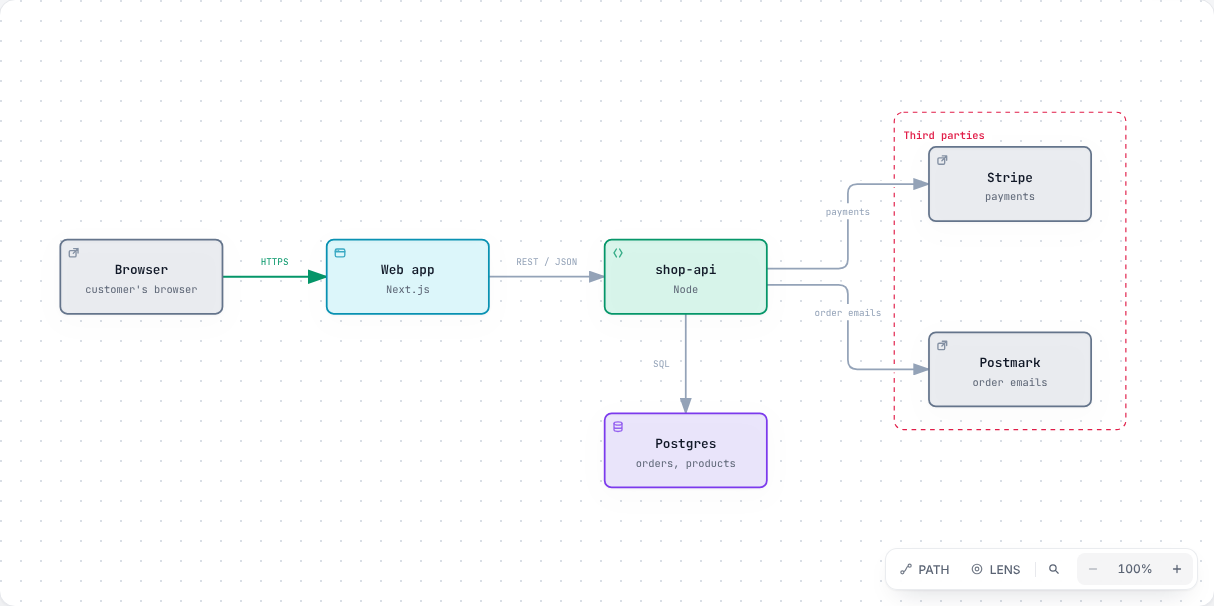
Sample run on 2026-10-03 with Archify 3.0.1 and illustrative data. Passed showcase validation with no errors or warnings.
Evidence
Our test
No baseline test yet. We will publish one, with and without the skill, when testing is done.
Reported by the community, by app
Compatibility labels come from our tests only. Community reports add detail but cannot mark an app as tested.
Editorial review in progress
We have not finished testing this listing against doing the task without it. The verdict appears here when we have. Our team made this skill; it gets the same test as external work.
How we reviewSetup and customization
- Requires Archify (MIT, github.com/tt-a1i/archify). The skill checks for it and gives the install commands.
- Needs Node.js.
What it can access
- Reads
- The diagram spec and the code or docs it describes
- Changes
- Writes the spec, the generated diagram and a sources note in your docs folder
Install
- Add the Skills Dugout marketplace once.
/plugin marketplace add piyush-tkd/skillsdugout - Install /diagrams-from-spec.
/plugin install diagrams-from-spec@skillsdugout - Start a new session and ask for it, for example "draw the architecture of this service as a diagram".
Not tested in Claude apps yet. These steps follow Claude apps's documented skills folder.
- Turn on code execution in Settings, under Capabilities. Skills need it.
- Download the skill zip from this page.
- Open Customize, then Skills, and choose Upload a skill. Pick the zip.
Not tested in Cursor yet. These steps follow Cursor's documented skills folder.
- Install it with one command. Needs Node.js 18 or later.
npx skillsdugout add diagrams-from-spec --app cursor - For one repository only, run it inside the repo and add --project.
- No Node.js? Download the zip from this page and unzip it into ~/.cursor/skills/.
Not tested in Codex yet. These steps follow Codex's documented skills folder.
- Install it with one command. Needs Node.js 18 or later.
npx skillsdugout add diagrams-from-spec --app codex - For one repository only, run it inside the repo and add --project.
- No Node.js? Download the zip from this page and unzip it into ~/.codex/skills/.
Not tested in GitHub Copilot yet. These steps follow GitHub Copilot's documented skills folder.
- Install it with one command. Needs Node.js 18 or later.
npx skillsdugout add diagrams-from-spec --app copilot - For one repository only, run it inside the repo and add --project.
- In VS Code, turn on the chat.useAgentSkills setting.
- No Node.js? Download the zip from this page and unzip it into ~/.copilot/skills/.
Community reviews
No reviews yet. Be the first to rate it after you try it.
Each review records the app, version, task and outcome; those outcomes feed the Evidence section. One rating per person; creators reply but cannot rate their own work.
No reviews yet. Be the first to rate it after you try it.
Source, license and versions
- Source
- github.com/piyush-tkd/skillsdugout/tree/main/plugins/diagrams-from-spec
- License
- MIT, as stated in the repository
- 0.1.0 · 2026-10-03 · First release.
Show the full skill instructions
Diagrams from a spec
Every diagram is generated by Archify (MIT) from a committed
JSON specification. This file is a house style on top of it. Archify's own SKILL.md remains the
reference for its schema and commands — read it for anything this file does not cover.
The rule underneath all of it: a diagram is documentation, and documentation is only worth having if it is true. A stale picture is read as fact faster than stale prose, because nobody proofreads a picture. Generating from a spec is what makes a correction an edit to a sentence rather than a nudge to a rectangle.
The file has two kinds of rule:
- General rules (sections 0, 1 and 3–7) apply to any diagram generated from a spec.
- House defaults (section 2) are presentation choices. Keep them for consistency across one site; change them deliberately if your pages need something else.
Figures marked "at 3.0.1" were checked against Archify 3.0.1 on 2026-10-03. Trust the installed version's own diagnostics over them.
0. Make sure Archify is available
Use the repository's own copy first, so everyone generates with the same version. Look in this order and use the first hit:
<repo>/tools/archify/bin/archify.mjs
~/.agents/skills/archify/bin/archify.mjs
~/.claude/skills/archify/bin/archify.mjs
Confirm it works and check the version:
node <path>/bin/archify.mjs doctor
node -e "console.log(require('<path>/package.json').version)"
If it is missing, install it. This is a git clone of an MIT-licensed repository — no sudo, no PATH
change, no package manager, and deleting the folder undoes it. Run it when the session's permission
mode allows; when it does not, print the commands and stop.
# The current stable ref comes from the project's own release manifest.
curl -s https://tt-a1i.github.io/archify/skill-updates/archify/stable.json
# → { "source": { "repository": "...", "ref": "v3.0.1" }, ... }

git clone --depth 1 --branch <ref> https://github.com/tt-a1i/archify /tmp/archify-src
mkdir -p <repo>/tools
cp -R /tmp/archify-src/archify <repo>/tools/archify
node <repo>/tools/archify/bin/archify.mjs doctor
The skill is the archify/ subdirectory of the repository, not its root. Pointing at the root
fails with Cannot find module. The repository also carries benchmarks, docs and experiments, which
is why the copy above takes only what is needed. Archify has no runtime dependencies; there is
nothing to npm install.
1. Where the files go
<docs-or-public-folder>/diagrams/<topic>/<name>.json         the specification — edit THIS
<docs-or-public-folder>/diagrams/<topic>/<name>.html         generated — never hand-edit
<docs-or-public-folder>/diagrams/<topic>/<name>.delivery.json  generated receipt — keep out of the published site
<docs-or-public-folder>/diagrams/<topic>/<name>.sources.md   where the example values came from
Commit them side by side, so a picture can be regenerated by whoever finds it wrong. deliver
overwrites the .html; anything typed into it by hand is gone at the next run.
Keep the caption and title with the page's other content, not hard-coded in the component that
embeds the diagram. If the sources.md would sit in a published folder, move it next to the page's
source instead.
2. House defaults
Layout:
- Let Archify size the canvas. Archify's own guidance is to omit
meta.viewBoxfor a fresharchitecturediagram so it measures the height it needs. Set one only to match a fixed frame, and then lay nodes out to fill it — a fixed box around a small diagram leaves empty bands. - Keep the width readable. The showcase
desktop-readabilitycheck sets the limit. At 3.0.1 it is the 930px desktop budget scaled by your smallest text: about 1085 wide with 7px labels, 1240 with 8px. Read the diagnostic rather than relying on a fixed number. - Widen and flatten rather than stack. A column of nodes is what produces a diagram taller than the screen. Empty grid cells are routing corridors, not wasted space — a node with more than four partners needs one.
Style:
- No
cards. The surrounding page should carry that content, where it gets corrected. - Omit
meta.visual_presetso every diagram opens in the same default style. meta.quality_profile: "showcase", always.
3. Authoring rules
- Prefer a boundary to an ordering when the point is trust or ownership.
architecturecan draw asecurity-grouparound a third party;sequencecannot, and "where does our data go" should be visible rather than inferred from which lifeline an arrow lands on. - A node's label must clear its own icon. The icon sits top-left and the label is centred, so a label filling the node collides with it. It can pass every check and still look broken. Shorten the label and put the full name in the sublabel.
- A crossing is a layout problem, not a routing problem. When
composition/proper-crossingfires, routing hints tend to fail in turn. Move a lane or a column instead — for example, put a shared sink lane between the two lanes that write to it.
If the diagram is a workflow
schema_version: 2, not 1. At 3.0.1, version 1 still pins a legacy fixed grid and rejects ordinary node widths with acolumn-capacityerror; version 2 computes lanes from node widths. (Other diagram types, such asarchitecture, accept only version 1.)- Width and height come from the content, not
meta.viewBox. To narrow the diagram, trim node widths and shorten labels. Check the deliveredviewBoxafter every run. - The canvas has fixed empty margins above the lanes and below the legend, which
meta.viewBoxcannot crop. Handle them in the embed step (section 5), never by editing the generated file.
4. Validate, then deliver
Check Archify's own SKILL.md for the preferred command. At 3.0.1 a single finalize run does
validate, deliver, check and browser-check together; the separate steps still work:
node <archify>/bin/archify.mjs validate <type> <spec>.json --quality showcase --json
node <archify>/bin/archify.mjs deliver  <type> <spec>.json <out>.html --quality showcase --json
- A pass means 0 composition errors and 0 warnings under the showcase profile. Check that the
output names the
showcaseprofile — at 3.0.1 the standard and showcase profiles run the same artifact checks, so the check count does not tell them apart. deliverrefuses to write unless it passes. That refusal is the feature.- On a diagnostic, apply one fix at a time, taken from the diagnostic's own
supportedFixesor its suggestedlabelAt/labelDy. Do not add routing hints before something asks for one. - A relationship label is data. When one collides, move it, then re-route, then shorten the wording — deleting it is not a geometry fix.
visual-check <out>.html --json --out-dir <somewhere-unpublished>gives browser evidence and writes screenshots. Look at them. It needs a browser: if it reports "skipped", setARCHIFY_CHROMEto a Chrome or Chromium binary. Always pass an--out-diroutside the published folder, or the screenshots ship with the site.
5. Embedding
Use one shared component or include for every diagram rather than a fresh iframe each time. It owns every change between the generated file and the page, so the generated file stays untouched and the result is the same on every build:
- Fixed-height frame, content scaled into it — never size the frame from the diagram.
- Crop at display time. After the iframe loads, set the SVG's
viewBoxto its content bounds and give it both width and height, so it scales instead of cropping. The.htmlon disk is not modified. - Make the frame a still picture.
?embed=1hides the toolbar but leaves click handlers live, which strands people in a zoom with no way back. Disable pointer events on the frame. - Interaction is a link above the picture, opening the full viewer. Use a real
<a>, not a button callingwindow.open, so middle-click, cmd-click and "copy link address" keep working. - Give the iframe a descriptive
title— that is its accessible name. Add a prose caption under it describing the whole picture; it is what sighted readers skim and the fuller description a screen-reader user can reach. - Load the iframe with
loading="lazy". At 3.0.1 each generated.htmlis around 750KB because the viewer inlines its runtime; lazy loading keeps that off the page until it is scrolled to. - Match the host theme if the page has one. At 3.0.1 the viewer reads a
?theme=query parameter; the embed component can pass the page's current theme. Otherwise the viewer uses its own light/dark control.
6. Content rules
- Prefer values from the real system — query the database, read the code, probe the API.
- Label anything illustrative as illustrative, in the caption or the node. Never use an invented value that looks real: an id made up for a design document, copied into a diagram, gets read as fact for months. Do not put real customer or record ids in a diagram that others will see.
- Distinguish what exists from what is proposed. A planned service drawn like a running one is a stale diagram on the day it is published.
- Record where example values came from — the query, the file, the endpoint — in the
sources.md, not in the diagram or caption. The next person refreshes them instead of inventing replacements. - Preserve exact identifiers — service names, endpoints, table and column names, env vars. Shorten a node's label if you must and put the exact name in its sublabel.
- When a diagram becomes wrong, the diagram is part of the change, in the same commit as the code that made it wrong.
7. Finishing
- Add a changelog entry only if the diagram changes what users of the page see or rely on.
- Update the nearest CLAUDE.md if the change alters how diagrams are built.
- Run the project's normal build, not a bare bundler command, so any checks it runs still apply.